How to Host a Node.js Discord Bot 24/7 (2026 Guide)
Learn how to host a Node.js Discord bot 24/7. This step-by-step guide covers discord.js, RAM requirements, environment variables, deployment, security, and reliable bot hosting.
Stop babysitting your terminal. Here's how to keep your discord.js bot online every hour of every day — without leaving your laptop running, and without waking up to "bot is offline" pings.
Building a Discord bot is a great way to learn JavaScript, APIs, databases, and real-time applications. With Node.js and the popular discord.js library, you can build everything from simple moderation bots to advanced community management, ticketing, economy, and automation systems.
But there is one problem with running your bot from your own computer: your computer isn't designed to be a 24/7 production server.
If your laptop goes to sleep, your internet disconnects, you restart your PC, or you accidentally close the terminal running your bot — your Discord bot goes offline.
The solution is to deploy your bot to a server designed to keep applications running continuously. In this guide, we'll explain why Node.js is a popular choice for Discord bots, how much RAM your bot may need, how to prepare it for production, and how to host a Node.js Discord bot 24/7.
Why Host a Discord Bot 24/7?
A Discord bot needs to maintain a connection with Discord to receive events and respond to users.
For example, when someone uses /ping, your bot needs to be running so it can receive the interaction and send a response.
Running the bot locally works perfectly for development, but it becomes inconvenient when your bot is being used by a real Discord community. A dedicated hosting environment allows your bot to run on a remote server instead of depending on your personal computer.
Common problems with local hosting
When you host your bot from your laptop or desktop, you have to deal with:
For a development project, this isn't a major problem. For a bot that your community depends on, it quickly becomes frustrating.
Why Use Node.js for a Discord Bot?
Node.js is one of the most popular environments for building Discord bots, especially when combined with discord.js.
Node.js is well suited to Discord applications because bots spend much of their time waiting for events such as messages, interactions, reactions, member updates, and API responses.
Event-driven architecture
Node.js uses an event-driven architecture that works naturally with applications such as Discord bots. Instead of constantly checking whether something happened, your bot can listen for events.
const { Client, GatewayIntentBits, Events } = require('discord.js');

const client = new Client({
  intents: [
    GatewayIntentBits.Guilds,
    GatewayIntentBits.GuildMessages,
    GatewayIntentBits.MessageContent
  ]
});

client.on(Events.MessageCreate, message => {
  console.log(message.content);
});
When Discord sends an event, your application can process it. This makes Node.js a practical choice for bots handling many simultaneous events.
Heads up: To read message content, you must enable the Message Content Intent in the Discord Developer Portal and include GatewayIntentBits.MessageContent in your client.
Large JavaScript ecosystem
Another advantage is the huge ecosystem available through npm. You can easily add packages for:
For Discord specifically, discord.js provides a mature JavaScript library for interacting with Discord's API.
How Much RAM Does a Discord Bot Need?
There isn't one RAM requirement that applies to every Discord bot. A small bot with a few slash commands can use dramatically less memory than a large bot that maintains caches for many Discord servers. As a general starting point:
| Bot Type | Suggested RAM |
|---|---|
| Small utility bot | 256 MB – 512 MB |
| Moderation or community bot | 512 MB – 1 GB |
| Larger bot with databases & caching | 1 GB or more |
| Audio or CPU-intensive applications | 1 GB or more |
These are guidelines rather than fixed requirements. Your actual usage depends on your code, dependencies, Discord intents, caching, database, number of servers, and other features.
If you're starting a simple discord.js project, 512 MB can be a comfortable starting point. You can increase the resources later if your application requires them.
How to Host a Node.js Discord Bot 24/7
Now let's look at the actual deployment process. The exact names of buttons and fields can vary between hosting panels, but the overall process is straightforward.
Create Your Discord Bot
Before purchasing hosting, you need a Discord application and bot. Go to the Discord Developer Portal and create a new application. Inside your application, create a bot and generate its token.
Keep your token private. Your Discord bot token is effectively a credential for your bot. Never publish it on GitHub, Discord, screenshots, or your website. If somebody obtains your token, they may be able to control your bot. If you accidentally expose it, regenerate the token through the Discord Developer Portal.
Prepare Your Node.js Project
A typical discord.js project may look like this:
my-discord-bot/
├── index.js
├── package.json
├── package-lock.json
├── .env.example
├── .gitignore
└── commands/
Your package.json contains the dependencies required by your application. For example:
{
  "name": "my-discord-bot",
  "version": "1.0.0",
  "main": "index.js",
  "scripts": {
    "start": "node index.js"
  },
  "dependencies": {
    "discord.js": "^14.0.0"
  }
}
Your bot's entry file might be:
const { Client, GatewayIntentBits, Events } = require('discord.js');

const client = new Client({
  intents: [
    GatewayIntentBits.Guilds
  ]
});

client.once(Events.ClientReady, (readyClient) => {
  console.log(`Logged in as ${readyClient.user.tag}`);
});

client.login(process.env.DISCORD_TOKEN);
Notice that the bot token isn't written directly into the source code.
Local development tip: If you use a .env file locally, install dotenv and add require('dotenv').config(); at the top of your file. On most hosting panels, you can set environment variables directly, so dotenv isn't required in production.
Store Your Bot Token Securely
Instead of doing this:
client.login('YOUR-BOT-TOKEN');use an environment variable:
client.login(process.env.DISCORD_TOKEN);Your hosting environment can then provide:
DISCORD_TOKEN=your_bot_tokenThis keeps credentials separate from your application source code. It also makes it easier to move your bot between development and production environments.
Upload Your Bot
Once your project is ready, upload the project files to your hosting environment. Make sure you include the files your application actually needs, such as:
index.jspackage.jsonpackage-lock.json- Your command folders
- Other files required by your application
Don't upload node_modules or a real .env file containing secrets.
Install Your Dependencies
After uploading the project, install the packages specified in package.json. For an npm project, this is normally:
npm installIf you have a package-lock.json, you can use a cleaner production install:
npm ciThis downloads packages such as discord.js and any other dependencies required by your application.
Configure the Startup Command
Your hosting environment needs to know which command should be used to start the bot. For many Node.js projects this will be:
npm startIf your project doesn't define an npm start script, you can typically start a simple application with:
node index.jsUse the startup command appropriate for your project's structure.
Start Your Bot
Once the files, dependencies, environment variables, and startup command are configured, start the application. Your console should show something similar to:
Logged in as MyBotYour bot should then appear online in Discord. At this point, you can turn off your own laptop. The bot continues running on the hosting server rather than depending on your personal computer.
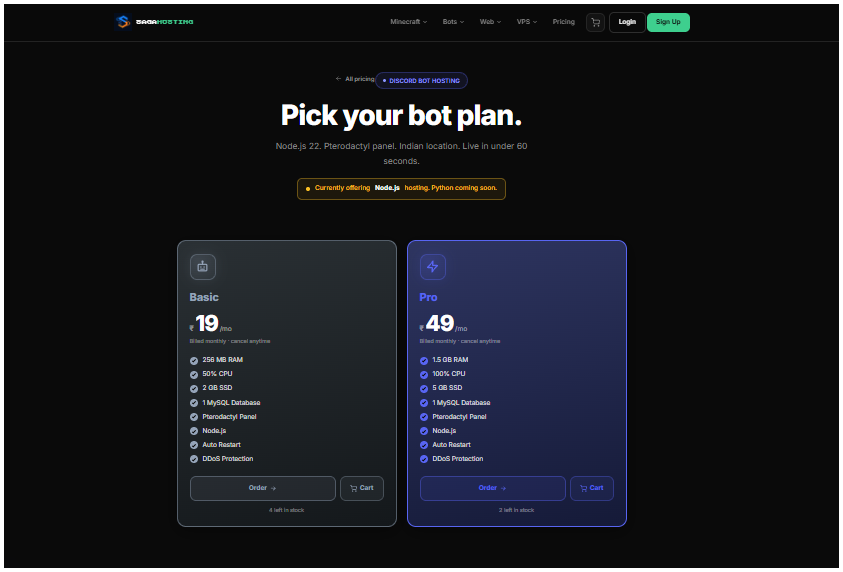
Need hosting? SAGA Hosting offers Node.js-friendly hosting plans designed for always-on Discord bots. You can start small and upgrade as your bot grows.
How to Keep Your Discord Bot Running After a Crash
Even well-written applications can encounter unexpected errors. For example, your bot might encounter:
This is why production hosting should have a way to restart applications when their process exits. A restart policy can bring the bot back online without requiring you to manually open a terminal and start it again.
Don't rely on error handlers alone
You should handle expected errors in your application, but you shouldn't assume that catching every possible exception makes the process safe to continue indefinitely. For serious failures, restarting the application is often safer than leaving a potentially corrupted process running. Add basic process-level error logging:
process.on('unhandledRejection', (error) => {
  console.error('Unhandled promise rejection:', error);
});

process.on('uncaughtException', (error) => {
  console.error('Uncaught exception:', error);
  process.exit(1); // Let the process manager restart the bot
});
Using PM2 on a VPS
If you're managing your own VPS, PM2 is a popular process manager for Node.js.
npm install -g pm2
pm2 start index.js --name discord-bot
pm2 startup
pm2 save
pm2 logs discord-bot
PM2 can restart your bot after crashes and keep it running after server reboots.
If you use a managed hosting panel, check whether it already provides automatic restarts.
Protect Your Discord Bot Token
One of the most important security rules for Discord bot development is simple:
Never hardcode your production token into public source code.
Avoid:
client.login('YOUR-SECRET-TOKEN');Instead:
client.login(process.env.DISCORD_TOKEN);You should also avoid committing secret environment files to Git repositories. A good .gitignore file can include:
.env
node_modules/If a token is accidentally uploaded to GitHub, assume that it has been compromised and regenerate it.
Use a Database Instead of JSON for Important Data
Many beginner Discord bots store data in a JSON file. For example:
users.jsonThis can work for a small experiment, but it becomes increasingly inconvenient as your bot grows. An economy bot may need to store:
A database such as SQLite can provide a more structured way to store this information. SQLite is particularly useful for smaller bots because it is lightweight and doesn't require a separate database server.
For larger applications, you may eventually move to a database such as PostgreSQL or MySQL.
Why Use Hosting Instead of Your Personal PC?
The biggest advantage is simple: your Discord bot no longer depends on your personal computer.
With your bot hosted remotely:
- Your personal computer can be turned off.
- Your bot can remain online.
- You don't need to keep your home PC running overnight.
- Your application can use the resources provided by your hosting plan.
- Automatic restart features can help recover from application crashes.
| Feature | Local PC | SAGA Hosting |
|---|---|---|
| Uptime | Depends on your PC | 24/7 |
| Sleep / Hibernation | Affects bot | No |
| Power / Internet outages | Bot goes offline | Server-grade uptime |
| Crash recovery | Manual restart | Automatic restart options |
| Resource usage | Uses your PC | Dedicated resources |
| Best for | Development | Production communities |
For a bot used by a small Discord community, this can make deployment considerably easier.
Host Your Node.js Discord Bot With SAGA Hosting
If you don't want to leave your personal computer running all day and night, you can deploy your Discord bot to SAGA Hosting.
SAGA Hosting provides hosting environments designed for applications such as Node.js Discord bots, allowing you to move your bot from your local development machine to a continuously available server environment.
Why choose SAGA Hosting?
Node.js support
Run Node.js applications and discord.js projects without maintaining your own physical server.
24/7 hosting
Keep your Discord bot running without leaving your personal computer switched on.
NVMe storage
Fast storage helps with application files, databases, logs, and other disk-heavy workloads.
Affordable plans
Budget-friendly options let you start small and upgrade as your bot grows.
Recommended plan by bot size
| Plan Type | Recommended RAM | Best For |
|---|---|---|
| Standard | 1 GB | Moderation, community, economy bots |
| Pro | 2 GB+ | Large bots, databases, audio, caching |
If your bot needs more RAM or resources later, you can choose a larger plan based on its actual requirements.
Frequently Asked Questions
Yes. A Discord bot can run continuously on a server designed for persistent applications. Your bot still needs to be correctly configured and your application needs to handle errors appropriately.
Yes. discord.js is a Node.js library, so a hosting environment that supports the required Node.js version can run a discord.js bot.
A small Discord bot can often run with a few hundred MB of RAM. More complex bots may require 1 GB or more depending on caching, databases, audio processing, and other features.
Yes. Once the bot has been successfully deployed to a remote server, your personal computer doesn't need to remain on for the bot to continue running.
Common causes include application crashes, incorrect credentials, network problems, API errors, resource limits, or problems in your bot's code. Check your hosting logs first to identify the actual error.
JSON can be fine for small experiments. For persistent user data and larger applications, a database such as SQLite is generally a better choice.
Yes. Node.js is particularly well suited to event-driven applications such as Discord bots, and the JavaScript ecosystem provides extensive tooling for working with Discord.
Conclusion
Running a Discord bot from your own computer is perfectly fine while you're developing and testing it. But once your bot is being used by an actual community, keeping your laptop switched on 24/7 becomes inconvenient.
By moving your Node.js and discord.js application to a dedicated hosting environment, you can keep the bot available without depending on your personal computer.
Prepare your project, protect your bot token, configure your environment variables, install your dependencies, set the correct startup command, and deploy your bot to a server designed for continuous operation.
Ready to move your Discord bot online?
Deploy your Node.js Discord bot with SAGA Hosting and let your hosting environment handle the always-on infrastructure while you focus on building your bot.
Deploy with SAGA Hosting →